A stiff neck that builds through the afternoon, an aching lower back after video calls, or a hand that feels tight after hours on a mouse can make work feel far harder than it needs to. A workstation ergonomic assessment service looks beyond the instruction to sit up straight. It considers how you work, the equipment you use, the tasks you repeat and how your body is responding, then provides practical changes tailored to you.
Whether you work from an office, a home study, a kitchen table or a mixture of locations, your set-up should support comfortable, sustainable working. Small adjustments can sometimes make a meaningful difference. Where symptoms are persistent or more complex, an assessment can also help identify when further clinical support may be useful.
When a workstation assessment may help
Ergonomic support is not reserved for people who are already in significant pain. It can be helpful when you are starting a new role, returning after injury or illness, changing to hybrid working, or spending longer hours at a desk than usual. It is also useful when a new chair, laptop, screen or sit-stand desk has not solved the problem you hoped it would.
Common concerns include recurring headaches, shoulder tension, upper or lower back discomfort, tingling in the hands, wrist or thumb pain, and fatigue that arrives after computer-based work. Sometimes the issue is obvious, such as a laptop screen that is too low. Often, it is a combination of factors: a chair that does not fit well, a mouse positioned too far away, a workload that limits movement breaks, and a previous injury that changes how you sit or move.
An ergonomic assessment is not about creating a picture-perfect desk. Bodies vary, jobs vary, and the best position is rarely one fixed posture held all day. The aim is to make your working environment fit your needs more closely, while building in opportunities to change position and move.
What happens in a workstation ergonomic assessment service
A workstation ergonomic assessment service begins with a conversation about your work and your health. Your practitioner will want to understand what you do during a typical day, which tasks aggravate symptoms, how long you spend at the workstation, and whether discomfort changes when you work elsewhere.
You may be asked about previous injuries, current treatment, activity levels and relevant health conditions. This context matters. For example, someone recovering from a shoulder injury may need a different mouse arrangement from someone managing persistent lower back pain. An assessment should give you clear, realistic advice rather than a generic checklist.
Looking at the workstation and the person using it
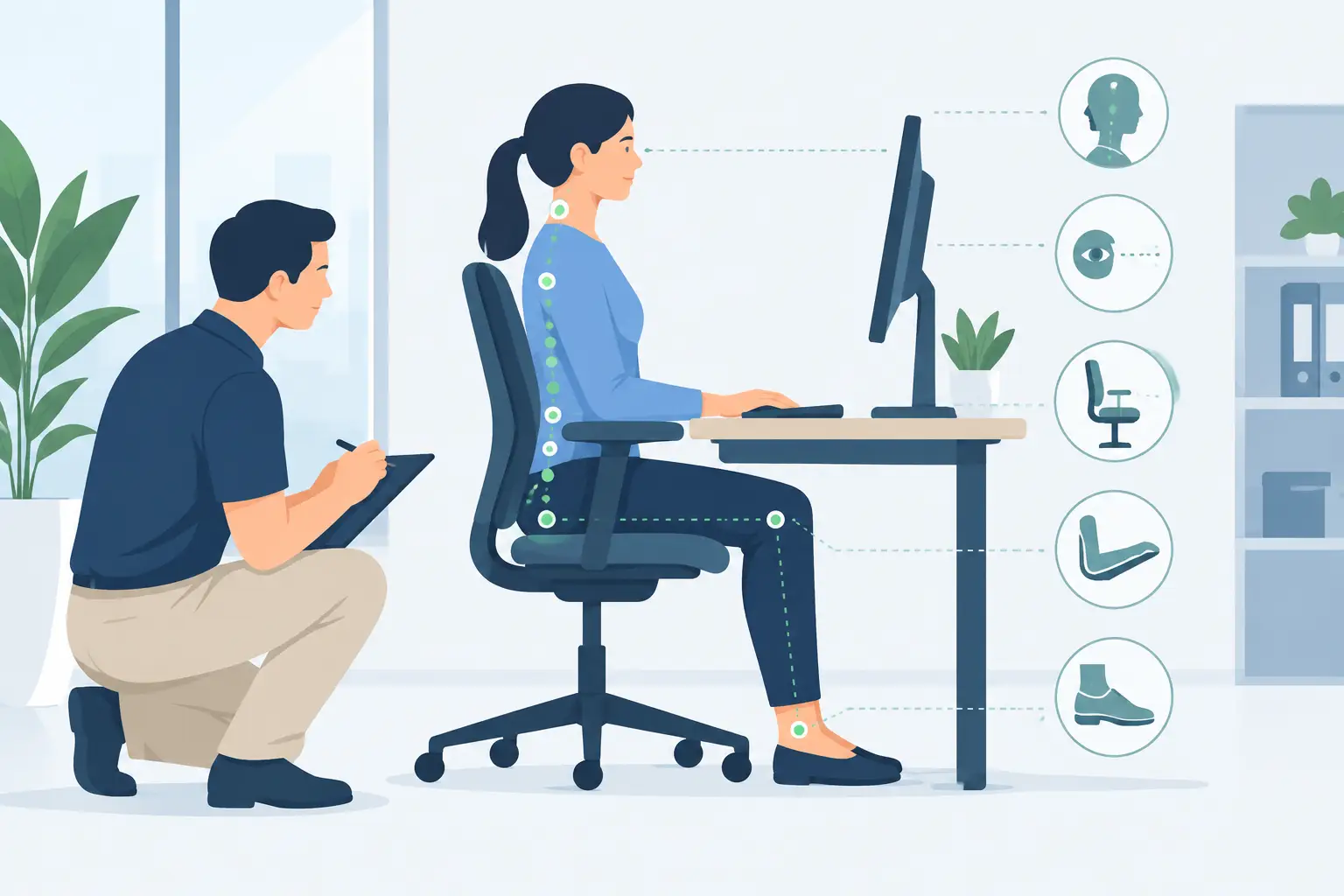
The assessment considers the relationship between you and your equipment. This may include your chair height and support, desk height, screen position, keyboard and mouse placement, lighting, phone use and the space available for your legs and feet. If you use a laptop, the assessment can consider whether a separate keyboard, mouse or screen riser would make the arrangement more comfortable.
Your practitioner may also observe your working posture and movement while you carry out usual tasks. They are not looking for a single correct pose. They are looking for avoidable reaching, sustained positions, awkward wrist angles, unnecessary muscle tension and equipment that encourages you to work in an unhelpful way.
Understanding the demands of your day
Your working habits matter as much as the chair you sit on. A graphic designer, administrator, clinician writing notes, student, driver completing digital paperwork and home-based business owner may all use a computer, but their demands can be very different.
The assessment can explore how often you switch between screens, take calls, use a headset, refer to paper documents or work with a touchpad. It can also consider workload pressures. A well-adjusted desk cannot remove the effects of working without a break for several hours, but it can make those hours less demanding on your body.
Recommendations should be practical and personal
Following the assessment, recommendations should fit your workplace, budget and daily routine. In some cases, changing the screen height and bringing the mouse closer may be enough. In others, a different chair, footrest, document holder, headset or keyboard may be worth considering.
A helpful plan usually prioritises the changes likely to have the greatest effect first. There is little value in replacing every piece of equipment if a few simple adjustments can improve comfort. Equally, it is worth recognising when existing equipment cannot be adapted sufficiently and needs to be changed.
Movement is normally part of the advice. Regular variation can reduce the load of prolonged sitting or standing, but the right approach depends on the person and the role. Brief changes of position between tasks may be more achievable than setting rigid movement targets that do not suit a busy working day. Where appropriate, your practitioner may suggest simple mobility or strengthening exercises to support the areas under strain.
Ergonomics is not only about posture
Posture can be useful to observe, but it is only one part of the picture. Stress, poor sleep, workload, a recent injury and reduced general activity can all influence how the body copes at work. Two people can use the same workstation and have entirely different experiences of discomfort.
This is why ergonomic advice works best when it is connected to your wider wellbeing. If symptoms continue despite sensible workstation changes, you may benefit from an assessment of movement, strength, joint mobility or an underlying musculoskeletal condition. Persistent numbness, weakness, severe pain or symptoms that are worsening should be assessed promptly by an appropriate healthcare professional.
At Faringdon Wellbeing Clinic, ergonomic assessment can sit alongside physiotherapy, osteopathy, sports and remedial massage, acupuncture or rehabilitation support where this is appropriate for your needs. Coordinated care can be particularly helpful after an injury, when symptoms involve more than one area, or when work demands are delaying recovery.
Office, home and hybrid working considerations
A dedicated office workstation may allow for more adjustments, but home and hybrid workers often have to make the best use of limited space. A dining table can be a workable temporary surface, although it may not provide the height, screen position or support needed for regular full-time use. The goal is not to make every home look like an office. It is to create the safest and most comfortable arrangement that is realistic for the time you spend there.
Hybrid work also brings a common challenge: a set-up may be suitable in one location but not another. If symptoms only appear on home-working days, that pattern provides useful information. Taking photographs of your usual work areas, or arranging an assessment where you normally work, can help ensure the advice reflects real conditions.
For employers, an individual assessment can complement wider display screen equipment processes by focusing on the worker’s specific symptoms, tasks and physical needs. It does not replace an employer’s responsibilities, but it can provide clearer guidance when standard adjustments have not resolved a problem.
Preparing for your appointment
It helps to think about when symptoms occur, what improves them and what makes them worse. If possible, note how long you spend at your workstation, whether you use more than one location, and any equipment you already have. A few photographs of your desk from the side and front can be useful for remote or home-based discussions.
Wear comfortable clothing if your assessment includes movement observation. Bring any relevant information about previous injury, treatment or work restrictions, and be ready to describe your usual day honestly. The most useful recommendations are based on how you actually work, not how you feel you ought to work.
Work should not regularly leave you too uncomfortable to enjoy the rest of your day. With informed adjustments and the right clinical support where needed, your workstation can become a place that supports concentration, comfort and confidence rather than adding to your pain.